
Table of Contents
Salsa Candela hosts monthly dance parties that attract 500+ attendees. During these events, bar service becomes a bottleneck: long lines, missed orders, and slow cash transactions reduce revenue and customer satisfaction.
This web application improves the bar experience by letting customers browse the menu, place orders, and pay from their phones.
When their drink is ready, they receive a QR code to pick it up at the bar, no waiting in line.
If you want to explore the live application, visit bar.salsa-candela.com.
Project Overview
This project created a mobile-first ordering system for a bar operating inside dance party events, enabling self-service ordering with integrated payments and pickup coordination.
Project Scope
- Digital Menu: Categorized drink list with images, descriptions, and real-time pricing
- Mobile Ordering: Customers order from their phones without making a line
- Automated Promotions: Time-based and combo-based deals applied automatically at checkout
- Stripe Payments: Secure card payments processed through Stripe
- QR Code Pickup: Unique QR code generated per order for fast, verified pickup at the bar
- Admin Dashboard: Real-time order management for bartenders
Business Impact
- Cash-Free Operation: No cash handling reduces theft risk and speeds up transactions
- Faster Service: Eliminates waiting in line to order and pay
- Reduced Errors: Digital orders eliminate miscommunication in a loud venue
- Promotion Automation: Happy hour deals and combos applied without bartender involvement
The Problem
Running a bar inside a dance event has many challenges that Salsa Candela struggles with:
1. Long Wait Times
During peak hours, customers wait 10-15 minutes to place an order. Many give up and don't buy, reducing revenue.
2. Handling Cash
Cash-only payments slow down every transaction. Making change in party venue leads to errors and its difficult to track sales and reconcile revenue at the end of the night.
3. Missed Promotions
Happy hour deals and combo promotions require bartenders to remember rules and calculate discounts manually. In practice, promotions are inconsistently applied or skipped entirely during rush periods.
4. Order Miscommunication
Shouting drink orders over loud music leads to mistakes. Wrong orders waste inventory and create customer frustration.
The Solution
A mobile web application that customers access by scanning a QR code at their table or at the bar entrance.
No app download required and it works in any mobile browser.
How It Works
- Customer scans a QR code to open the menu
- Browses drinks by category, adds items to cart
- Promotions are applied automatically at checkout
- Pays securely via Stripe (card payment)
- Receives a unique QR code for their order
- Shows QR code at the bar to pick up drinks
Why a Web App?
A native app would require customers to download and install before ordering. A progressive web app accessible via URL means zero friction: scan, browse, order.
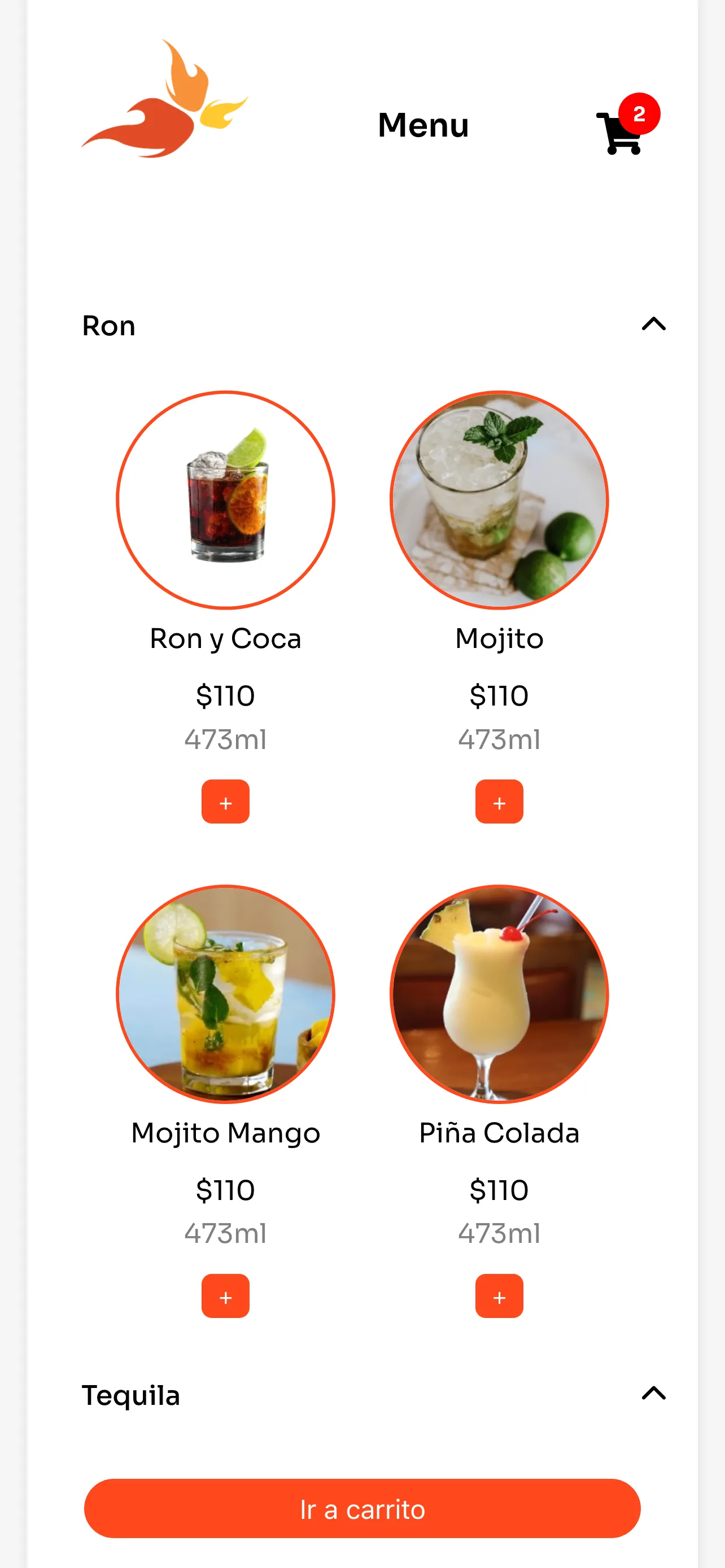
Light theme with high contrast for visibility at the venue
Key Features
The application includes several features designed to maximize bar revenue, reduce wait times, and create a seamless customer experience.
Digital Menu
The menu is organized by category (cocktails, beer, shots, non-alcoholic) with images, descriptions, and prices. Items can be added to a cart with quantity selection.
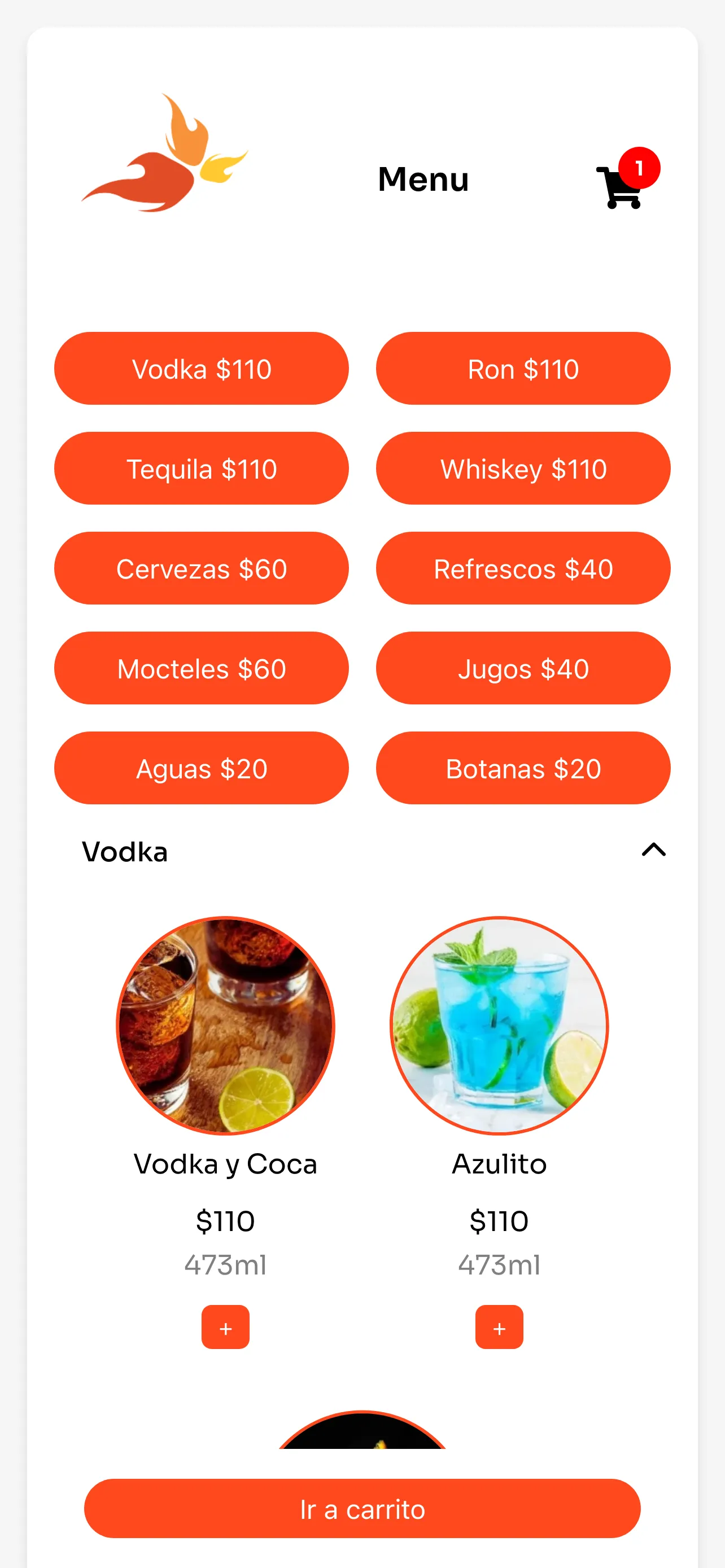
Categorized drink menu optimized for quick browsing on mobile
Business Value:
- Visual Selling: Photos of cocktails increase average order value compared to text-only menus
- Easy Updates: Menu items, prices, and availability managed through configuration
- Upselling: Suggested pairings and popular items highlighted automatically
Automated Promotions
Promotions are defined as rules in a configuration file and applied automatically when conditions are met. No bartender intervention needed.
Promotion Types:
- Time-Based: Happy hour pricing active during specific windows (e.g., 9:00-10:00 PM)
- Combo Deals: Buy 2 cocktails, get a shot free
- Volume Discounts: Bucket pricing for beer orders
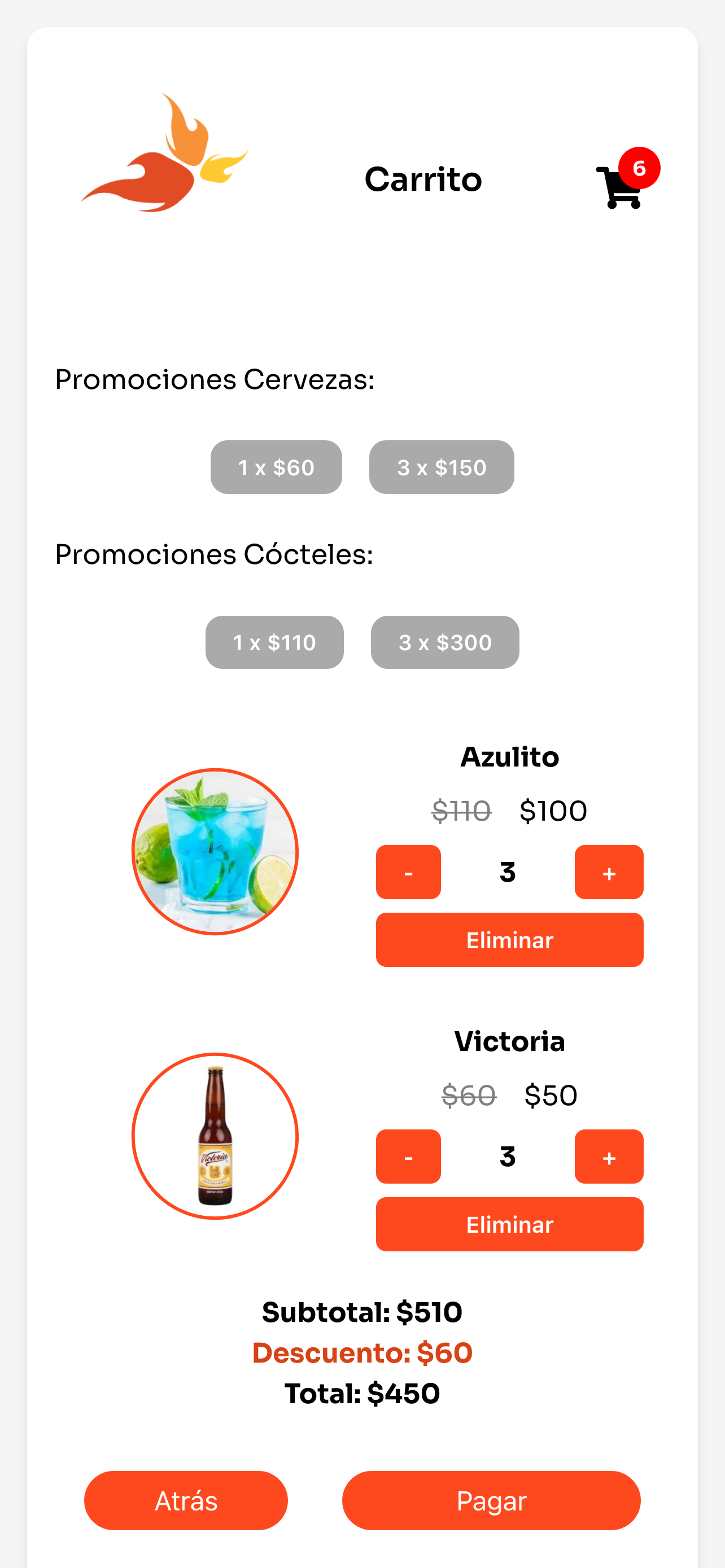
Promotions displayed prominently and applied automatically at checkout
// Promotion rules configuration
const promotions = [
  {
    name: "Happy Hour",
    type: "time-based",
    startTime: "21:00",
    endTime: "22:00",
    discount: { type: "percentage", value: 20 },
    appliesTo: "cocktails",
  },
  {
    name: "Combo Deal",
    type: "combo",
    requirements: { category: "cocktails", quantity: 2 },
    bonus: { category: "shots", quantity: 1, price: 0 },
  },
];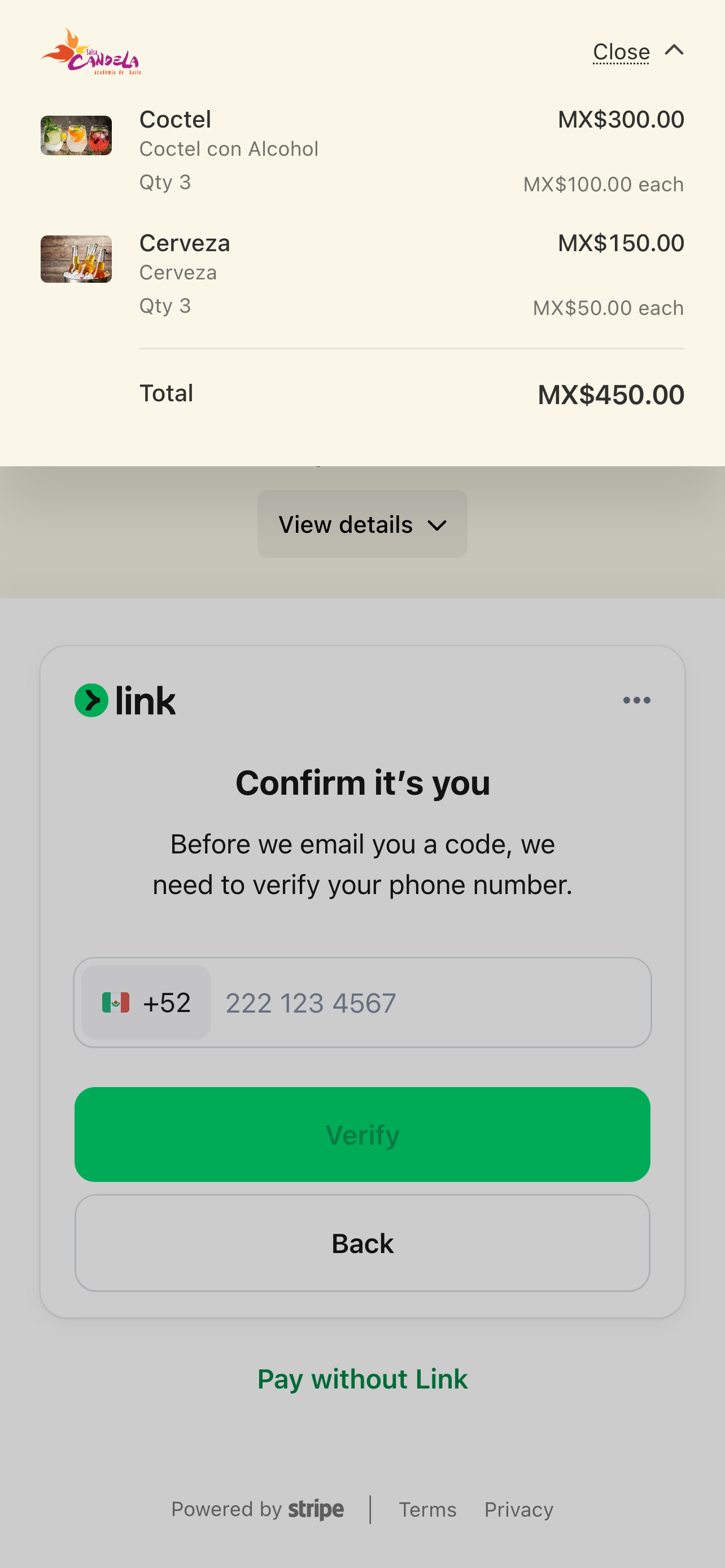
Order summary with automatic promotion applied before payment
Stripe Payments
All payments are processed through Stripe, providing secure card payments with instant confirmation. No cash handling required.
Payment Flow:
- Customer reviews order total with applied promotions
- Enters card details in Stripe's secure payment form
- Payment is processed and confirmed instantly
- Order is sent to the bartender's dashboard
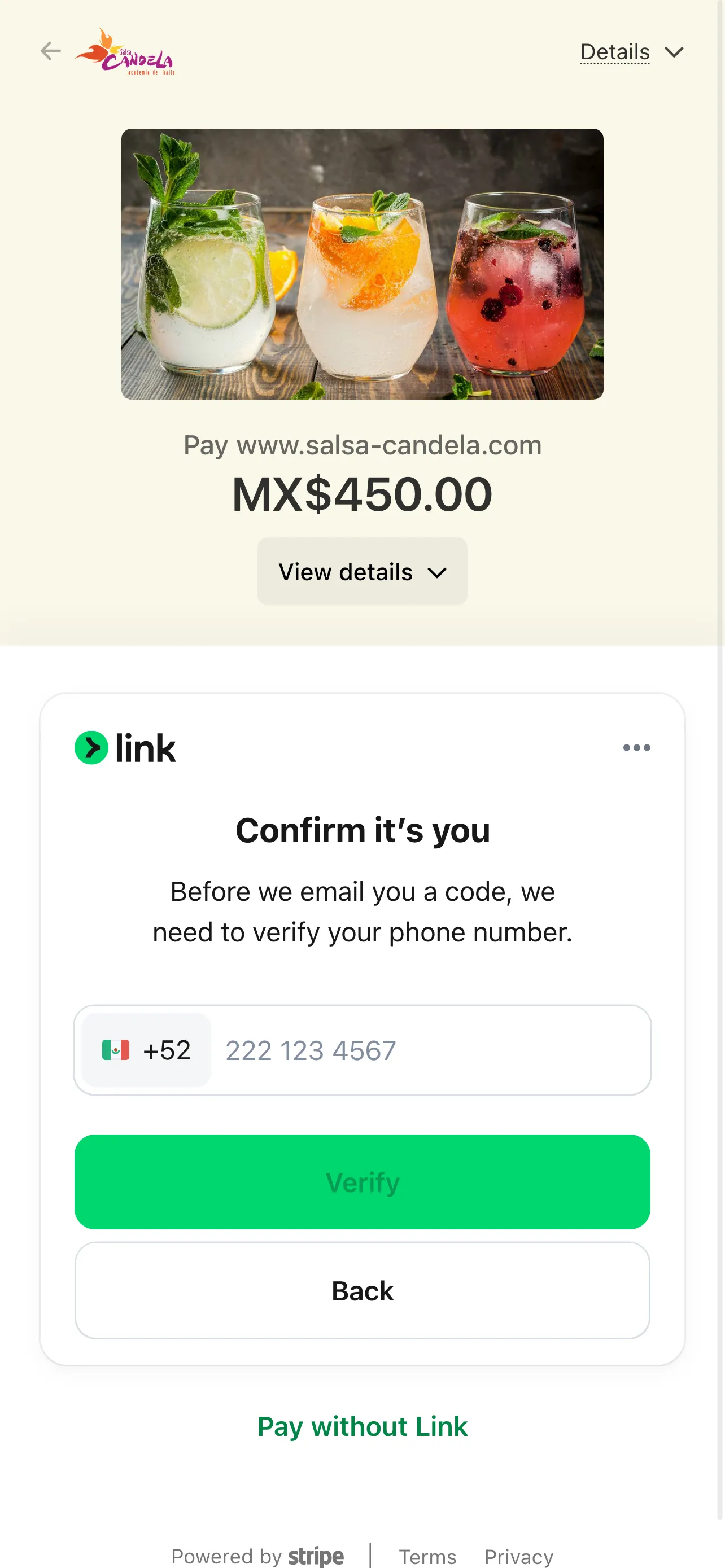
Secure Stripe checkout integrated directly into the ordering experience
Business Value:
- Instant Reconciliation: Every transaction recorded automatically with Stripe dashboard access
- No Cash Risk: Eliminates theft, counting errors, and change-making delays
- Higher Spend: Card payments typically increase average order value vs. cash
QR Code Pickup
After payment, customers receive a unique QR code on their phone. They then show the QR code at the bar for instant verification and pickup.

Unique QR code per order enables fast, verified pickup without receipts
How It Works:
- Order is paid and confirmed
- Unique QR code generated and displayed on customer's phone
- Bartender prepares the order (visible on admin dashboard)
- Customer shows QR code at bar
- Bartender scans QR to verify and mark as picked up
Business Value:
- No Double-Serving: Each QR code can only be redeemed once
- Order Tracking: Full visibility into pending, ready, and picked-up orders
- Faster Pickup: No verbal confirmation needed—scan and go
Design & User Experience
The app was designed for a specific environment: a dark, loud venue where users are standing, holding a phone in one hand, and want to order quickly.
Design Decisions
- Large Touch Targets: Buttons and menu items sized for one-handed, standing use
- Minimal Steps: Three taps from menu to payment (add to cart, review, pay)
- High Contrast: Text and prices clearly readable in any lighting condition
- No Account Required: Customers order as guests to eliminate sign-up friction
User Flow Optimization
Ordering Path:
- Scan QR: Opens menu instantly in browser
- Browse & Add: Tap items to add, adjust quantities
- Review Cart: See items, promotions applied, total
- Pay: Stripe secure checkout
- Get QR: Pickup code displayed immediately
Technology Approach
The stack was chosen for real-time responsiveness, mobile performance, and integration with Stripe's payment infrastructure.
Technology Stack
- Frontend: React (mobile-first SPA)
- Backend: Node.js + Express.js
- Payments: Stripe API
- QR Generation: Server-side QR code generation per order
- Admin Dashboard: Real-time order management interface for bartenders
Why React?
Unlike the main Salsa Candela website (which uses server-rendered EJS templates), the bar app needs real-time interactivity: cart management, live promotion calculations, and instant payment feedback. React's component model and state management make this straightforward.
Order Data Structure
// Order creation structure
const order = {
  items: [
    { id: "mojito-classic", name: "Mojito", quantity: 2, price: 120 },
    { id: "shot-tequila", name: "Tequila Shot", quantity: 1, price: 0 },
  ],
  promotions: [
    { name: "Combo Deal", discount: 80 },
  ],
  subtotal: 320,
  discount: 80,
  total: 240,
  paymentMethod: "stripe",
  status: "pending", // pending, ready, picked-up
  qrCode: null, // Generated after payment confirmation
};
Challenges & Solutions
Building for a live event environment introduced challenges that typical e-commerce apps don't face.
Challenge 1: Unreliable Connectivity
Problem: Crowded venues with 500+ phones competing for bandwidth. Dropped connections mid-order would lose sales.
Solution: Optimized payload sizes and implemented local state persistence. If connectivity drops, the cart is preserved and payment retries automatically when connection restores.
Challenge 2: Concurrent Orders During Peak
Problem: Peak hours generate dozens of simultaneous orders. Bartenders need clear prioritization without confusion.
Solution: Admin dashboard displays orders in real-time with status indicators (pending, preparing, ready). Bartenders update status with one tap, and customers see their order progress.
Challenge 3: Promotion Edge Cases
Problem: What happens when happy hour ends mid-order? Or when a combo promotion partially applies?
Solution: Promotions are locked at cart review time. Once a customer sees their discounted total, that price is honored even if the promotion window closes before they complete payment.
Future Enhancements
The application is designed to grow with the business. Planned enhancements include:
Prepaid Credit Wallet
Customers purchase credit in advance with a single Stripe transaction—similar to buying tickets at a fair—and then spend from their wallet for each drink. This reduces per-order transaction fees, speeds up service, and encourages higher spending throughout the event.
Inventory Tracking
Real-time stock levels that automatically mark items as unavailable when inventory runs low, preventing orders that can't be fulfilled.
Analytics Dashboard
Post-event reports showing peak ordering times, most popular drinks, promotion effectiveness, and revenue per hour to inform future event planning.
Multi-Event Support
Configurable menus and promotions per event type, allowing different setups for dance parties, private events, and special occasions.
Get in touch!
I'm currently open to work and I'd be happy to chat.
Feel free to reach out if you are interested in what I can bring
to your project or team.